 App
App ENG
ENG NL
NLe-Invoicing 2.0: Effective, Paperless and therefore Extremely Sustainable and Efficient.
In order to achieve better enforcement of VAT legislation, governments of various countries worldwide decided approximately 15 years ago and in conjunction with one another, to issue a number of new e-Invoicing rules.
1. It was decided that Paper and PDF invoices after a certain period, would not remain legally valid in B2B transactions, but would be replaced by invoices in a structured format, such as UBL, Peppol BIS Billing 3.0, or other similar invoice formats.
2. It was also decided that the exchange of these e-Invoices had to take place mandatorily via the Peppol network or similar networks.
3. In addition to the definitions for Invoice Formats and Distribution Networks, the authorities also published a Four-corner e-Invoicing Model, which depicts the route that e-Invoices follow when they are sent from supplier to customer via the Peppol network. This Four-corner model shows that UBL invoices are Automatically posted in the customer's accounting system, as soon as they are received from the Peppol network.
This automated posting of purchase invoices from the Peppol network, was expected to result in significant labor savings, thereby acting as the Engine behind the adoption of e-Invoicing via Peppol.
The Four-corner Model of the authorities looks as follows: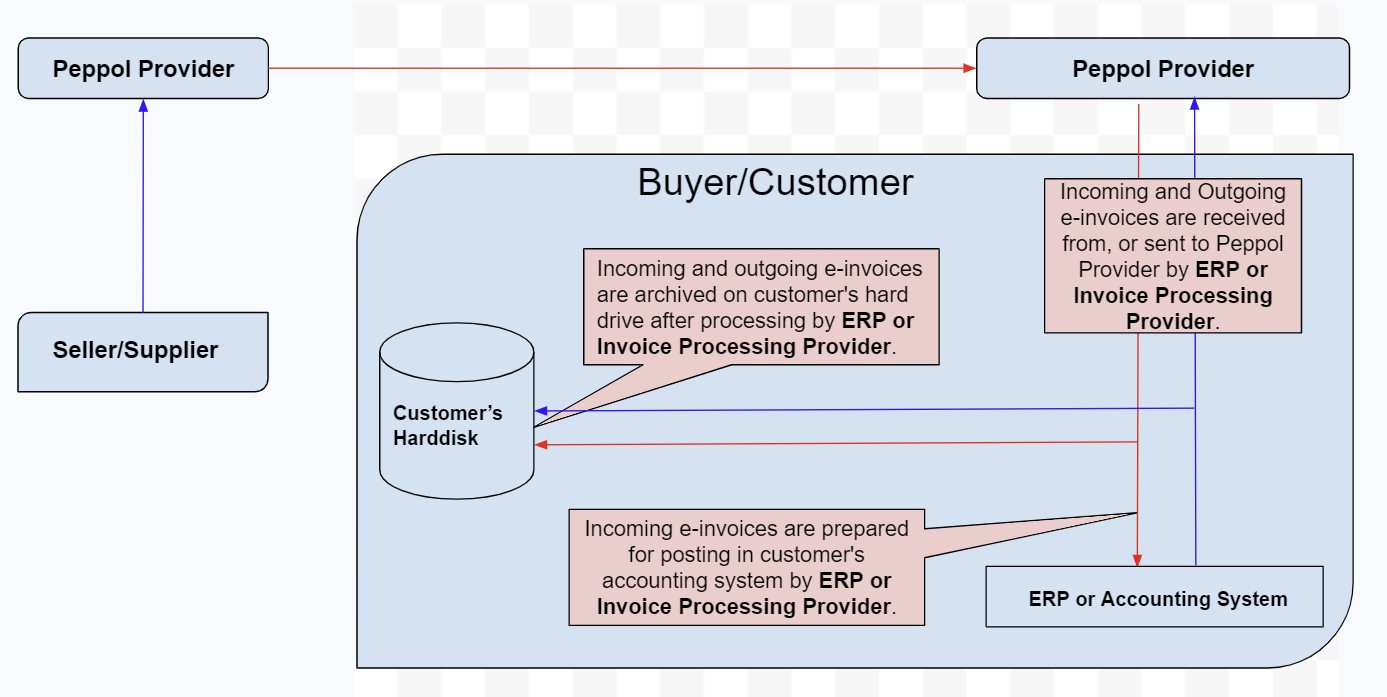
All e-Invoicing stakeholders from the relevant countries, such as ERP software suppliers and other e-Invoicing service providers, were requested in a Covenant to comply with the newly issued rules during the development of their new e-Invoicing products.
For instance, ERP software vendors have modified their applications so that invoices are not only generated on paper or in the PDF format but also in the UBL format; And they have also developed the mechanism used for executing the automatic invoice postings.
However; despite all the efforts made by stakeholders and government agencies who awarded contracts exclusively to suppliers using e-Invoicing, in the hope that e-Invoicing would thus spread through the business community like an ink stain, hardly anything has come of that ink stain after 15 years, and in our opinion this is due to the following causes:
Technically, it's quite a feat to post e-Invoices directly into the customer's accounting system from the Peppol network without any human intervention, but posting invoices automatically, implies that the invoices end up Unvalidated in customer's accounting system, making it uncertain whether the accounting system of the client still gives a true picture of the actual financial situation, and as a result, customers almost always reject automated invoice postings, and this in our vision, caused the failure of e-Invoicing adoption over the past 15 years, and it will continue to fail, unless something changes.
The traditional and correct procedure for received purchase invoices to be processed in administrations, is as follows:
1. First, the underlying procurement documents such as purchase orders, delivery notes, bills of lading, etc. are located and attached to the invoices.
2. Next, based on these underlying procurement documents, the purchase invoices are Validated and Coded (Coding means determining the general ledger accounts to which the invoices will be posted)
3. And only when point 1 and 2 have been completed, the purchase invoices are posted in the client's accounting system.
The mechanism responsible for the automatic posting of purchase invoices is designed to operate autonomously, meaning the invoices are posted to customers’ accounting system, without human intervention, when the invoice is received from the Peppol network.
But since looking up and attaching of the underlying procurement documents to the invoices and validating and coding the invoices, as mentioned in points 1 and 2 above, Cannot be done autonomously, because these tasks can only be performed by humans, they are Simply skipped during the automatic posting of purchase invoices, and only point 3 is executed, namely the actual posting of the Unvalidated and Uncoded invoices to Predefined General ledger accounts in the accounting system of the client.
Skipping steps 1 and 2 during the Automatic posting of invoices, results in the invoices ending up in the client's accounting system Unvalidated.
Automatically posting purchase invoices is presented as a time-saver and is also said to lead to paying purchase invoices earlier. However, we dare to say that automatically posting invoices is more likely to add work rather than save it. The automatic entries made to predefined general ledger accounts are, by definition, temporary entries that will need to be reversed and replaced with final entries once the invoices have been validated and coded, which will ultimately have to happen anyway. Automatically posting purchase invoices can especially create big challenges when financial reports need to be generated from the accounting system, and regarding the payment of Unvalidated purchase invoices earlier, we don't think many business owners would actually pay Unvalidated purchase invoices, let alone early.
To prevent the posting of Unvalidated invoices, some ERP applications first store the coding rows in an intermediate file, giving accountants the opportunity to decide from this intermediate file, which invoices should be admitted to the accounting system and which should not.
While this seems a good method, accountants would still need to perform the tasks as mentioned in points 1 and 2 above, to assess whether the invoices should be admitted to the accounting system. This would cause the labor savings achieved through Automatic invoice posting, to be vanished completely; therefore, saving data to an intermediate file is not an effective method for preventing the posting of unvalidated purchase invoices.
Within the EU, e-Invoicing will become mandatory for all cross-border trade, starting in 2030, and various countries are on the verge of mandating e-Invoicing for all B2B trade, or have already done so, such as Belgium and Germany.
The e-Invoicing world therefore faces the following major challenges:
-A non-functioning Adoption Engine for e-Invoicing.
-EU and National legislation mandating e-Invoicing, is coming into effect soon.
-The knowledge that companies will face a significant additional administrative burden of up to 20% in their Procurement Administration, if e-Invoicing is implemented without a properly functioning Adoption Engine.
Consequently, there will soon be a great need for a well-functioning e-Invoicing mechanism capable of serving as the new Engine for e-Invoicing adoption, and to meet this need, we have developed our:
Procurement Document Managerabbreviated PDM Web Application,
Which will allow the Procurement Administration to be carried out much more efficiently, and our PDM App will Not achieve these time savings by cutting out essential Procurement Administration functions, but by Digitizing and Automating it.
The Procurement Administration is an administrative gateway to accounting systems, where Purchase invoices are prepared for posting in the accounting system and Sales orders are prepared to be Invoiced. The Procurement Administration is the place where the many tens of thousands of procurement documents, such as purchase orders, sales orders, order confirmations, waybills, delivery notes, and so on, exchanged between suppliers and customers are recorded, in order to initiate, monitor, and manage the mutual trade, and ultimately to be able to Validate the resulting Purchase Invoices and to Prepare Sales Orders to be invoiced.
Procurement Administrations can turn into large, labor-intensive puzzles, especially when companies have hundreds or even thousands of pending purchase and sales orders, each of which can consist of three to four separate procurement documents, meaning companies have to really go all out to manage their procurement administration properly.
The Procurement Administration is the only part of business administrations, that have never been Digitized or Automated, and is still managed in a very old-fashioned Inefficient Paper way, which means the many tens of thousands of procurement documents have to be: printed, sorted, collected in folders, organized by number and alphabetically, and stored for many years in binders and archives, manually.
This implies that there is a huge Efficiency advantage to be gained in Digitizing and Automating this old-fashioned managed Procurement Administration.
So what could be more logical than to Digitize and Automate Procurement Administrations and use the huge Efficiency benefits that come from this as the New Engine to kickstart the adoption of e-Invoicing.
We have incorporated our vision into an improved Four-corner model, which we have named the “e-Invoicing 2.0 Model”, and show it below.
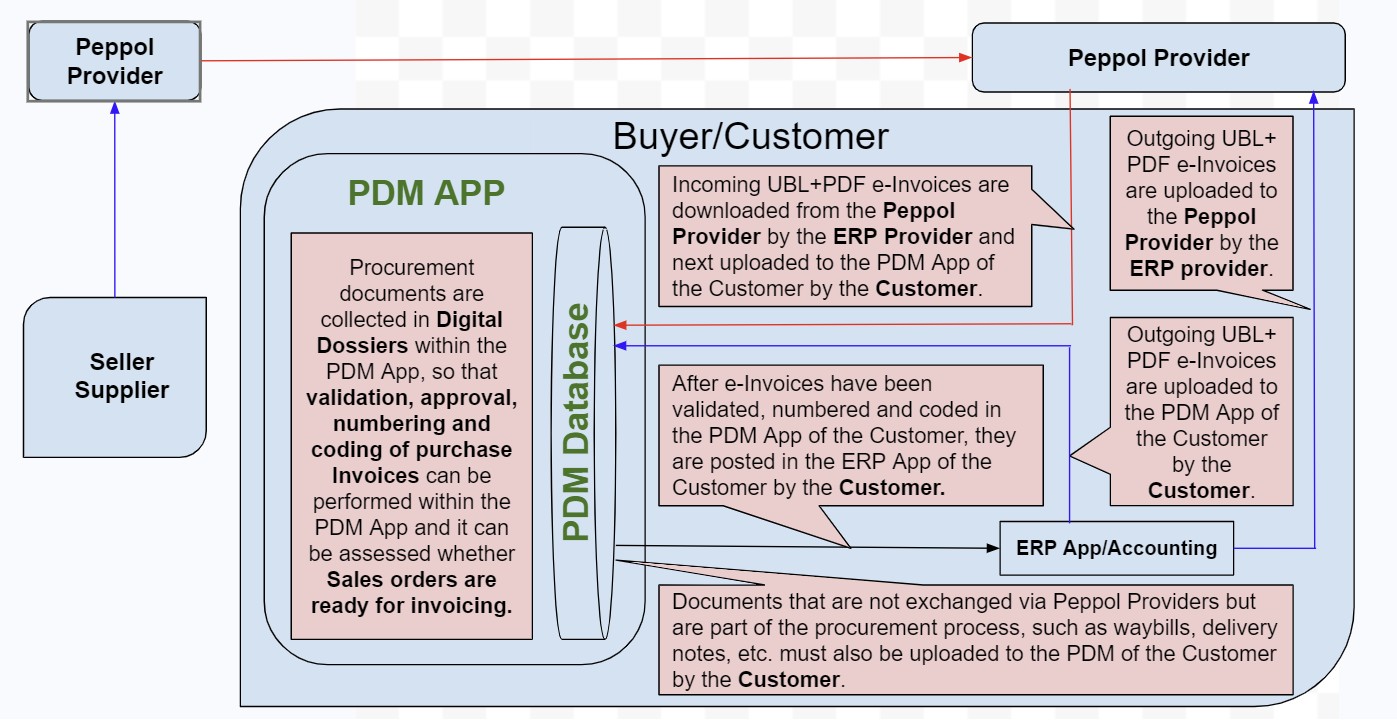
As you can see, the e-Invoicing 2.0 Model is clearly derived from the governments' Four-corner Model, and we have added a large number of Procurement functions and a Database where all procurement documents are stored.
During the development of the e-Invoicing 2.0 Model, we took great care to ensure that the rules agreed upon with the authorities in the Covenant were not violated, so that the objective for which e-Invoicing via Peppol was established, namely, improving the enforcement of VAT legislation in accordance with European ViDA legislation, can be fully realized.
Please note that our PDM App is not a Billing App that can be used to create sales invoices, but an app where the Procurement Administration is managed digitally. Hence the name PDM, which stands for Procurement Document Manager, and how the app works is explained in more detail below;
To explain how the PDM functions, we break its functionality down into 2 parts, namely:
1. The Digitisation part and
2. The Managing part.
1. The Digitisation part is that part of the PDM App where the procurement documents are uploaded to the PDM App and subsequently stored in the PDM Database, whereby they are and will remain Digitised and Archived until you remove them from the database.
Digitizing procurement documents is an alternative to printing them, which implies that when using the PDM App, procurement documents NEVER AGAIN need to be printed on paper as was customary in the past, but Uploaded to the PDM App.
And regarding the documents uploaded to the PDM App, we can be brief: these are All conceivable Purchasing and Sales procurement documents exchanged between companies, From Quotation to Invoice, including UBL and PDF purchase and sales invoices, Photos, but also procurement documents that Are not exchanged via Peppol, but for example by email.
You can put the Uploading of documents to the PDM App into practice further down this page using Live exercises with the PDM App.
All procurement documents stored in the PDM database are kept there for many years, where they are easily traceable and accessible, without having to dig through dusty archives. Also procurement documents stored in the PDM database can never get lost, unlike what often happens in traditionally managed procurement records.
2. The Managing section of the App contains the digital functions required to conduct the procurement administration digitally, so not on paper, and these are the following:
A. Dossier Formation, All procurement documents uploaded to the PDM app are assigned by the PDM user to common folders of related documents. The PDM user creates the folders based on their own criteria, but for managing the procurement administration, it's convenient to do this based on Purchase and Sales Orders, just like it used to be with paper dossiers.
-B. Approval, Purchase invoices are submitted to staff members, in the role of Budget Holders, for approval through the PDM App.
During Approval, PurchaseSerialNumbers are assigned to Purchase Invoices, and they are linked to the Current Bookyear.
-C. Coding, After approval, the Purchase Invoices (and, if necessary, also the Sales Invoices) are coded by the PDM user for booking in the accounting system, based on the underlying documents in the dossier, and only after coding based on the underlying documents, invoices can be posted in the accounting system.
Unlike automatic invoice posting, when using the PDM App, invoices are only recorded in the accounting system after they have been validated and coded based on the underlying documents.
The time savings when using the PDM App don’t come from skipping essential procurement functions, but from the Digitization and Automation of procurement administration. The PDM App doesn’t change anything in the procurement administration itself.
How the automation functions work in practice can be seen by using the PDM App live from this website. Within the PDM App, there are detailed explanations of how each function should be used.
Within the e-Invoicing 2.0 Model, with every UBL invoice that is distributed, a PDF version of the same invoice is also sent along. This is done because UBL invoices are very suitable for visualizing VAT flows between companies, but for accountants to use them for bookkeeping, they are unsuitable. Of course, UBL invoices remain the legally valid invoices, while the PDF invoices only play a supporting role, so using PDF invoices in this way is not in conflict with the Covenant.
To ensure that the UBL and PDF invoices always remain inseparably linked within the PDM App, they are uploaded to the PDM App as an InvoicePair, and you can also try uploading them as an InvoicePair Live on this page, as an exercise in the PDM App.
The Enormous efficiency benefits achieved with the PDM App, which are necessary to function as a Engine for the adoption of e-Invoicing, are the result of the Digitisation and Automation of the Total Procurement Palette; thus, not only the Invoices, but All procurement documents, from Quotation to Invoice, regardless of whether they are distributed via the Peppol Network or by email. This yields a whole range of Efficiency, Cost, and even Environmental benefits, as listed below:
-A significant saving in time and personnel costs, because documents that aren't printed also don't involve related tasks such as printing, sorting, collecting, and storing the documents in folders and archives.
-No more paper and printer costs.
-Space savings since the cabinets and spaces where these documents were stored and archived no longer need to be used for that purpose.
-A Formidably lower environmental impact, because the many tens of thousands, and in many companies even hundreds of thousands, of procurement documents no longer need to be printed.
Thanks to all these efficiency benefits, the e-Invoicing 2.0 Model generates an extremely strong Engine, making the adoption of e-Invoicing via Peppol easy to launch.
We estimate that the use of the PDM App can lead to savings of up to 30 to 40 percent on the Procurement administration, including the processing of UBL invoices.
Another feature that increases the efficiency of the PDM App is the Incomplete Dossiers overview. Incomplete Dossiers are dossiers to which no Purchase or Sales Invoice has yet been added. The “Incomplete Dossiers” overview can be used to detect Sales Orders Yet to be Invoiced, thereby reducing the chance of Forgotten Invoicing. This overview is also used to detect Purchase Invoices that are still to be received.
Journal entries created within the PDM App are digital in nature and can therefore potentially be automatically imported for posting by ERP Apps, which further increases the efficiency of the PDM App. Of course, this feature is only available when it is supported by the ERP Apps.
The fact that PDM is a WEB App also brings extra efficiency benefits, because certain tasks, like approving Purchase Invoices, can be done over the internet. This prevents bottlenecks in the procurement administration since employees who need to approve the Purchase Invoices don't have to be in the office.
However, others like accountants, administrative offices, auditors, and even tax inspectors, can also carry out their work through the internet using the PDM App.
Especially for Accountants, this is a huge breakthrough, because even though ERP applications have been usable via the web for many years, this group could still mostly only work from the office because the procurement documents they deal with frequently were not yet accessible online.
With the rise of digital photography, photos have become an increasingly important part of our daily lives, and this certainly applies to procurement administrations as well. For instance, the delivery or receipt of goods is often captured in photos, among other things to verify whether the delivery was handled correctly. How efficient is it, then, that photos can be uploaded to the PDM App just like procurement documents and assigned to dossiers?
We would like to advise any government considering making e-Invoicing mandatory to first take a look at our website, to probably come to the conclusion that mandates are not necessary, because PDM leads to very large efficiency improvements and cost savings for companies, while implicitly supporting e-Invoicing.
And to help you with your first live use of the PDM App, we go through two practical exercises below that you can perform live on this website, in the PDM App.
- The first exercise shows how UBL invoices are supported by the PDM App and how UBL invoices can be displayed within the PDM App. If you want to do this exercise, you can do it as follows:
Click on: "PDM App" at the very top left of this page’s menu and then click on "Login" on the right side of the page to log in to the PDM App. You will then land on a page in the PDM App that displays a list of uploaded documents.
You can now view any document on this list in PDF or UBL with just one click of the corresponding button.
- In the second exercise, we’ll show you how to upload a UBL/PDF Invoice Pair to the PDM App:
To do this, click on "Upload UBL+PDF Docs." in the left menu and then click on “choose files” on the right, select 1 UBL file and 1 PDF file, and then click "Open" to upload the files to the PDM App.
Next, click on "Assignable Documents" in the left menu, which will take you to the same page you visited earlier, but now also lists the documents you uploaded. You can also view these documents in UBL or PDF.
The "Upload UBL+PDF Docs" Menu Option in the PDM App is intended for uploading UBL+ PDF Invoicepairs to the PDM App.
For uploading other Single documents and Photos that are part of the procurement process, within the PDM App, you can use Menu Option: "Upload Single Docs", which works in the same way as "Upload UBL+PDF Docs", except that only 1 document is uploaded here.
If you would like to evaluate the PDM App Exclusive and Intensive, you can request a free 2-month trial with us at the bottom of this page. PDM is new in the e-Invoicing world and can trigger a huge e-Invoicing revolution, but also a massive Environmental and Sustainability revolution, so definitely a good reason to give it a try.
In the coming years, we will act as a lifeline for companies that run into trouble due to government-mandated e-Invoicing, but we're more than just a lifeline. Our PDM App can already, even without e-Invoicing mandates, take companies' procurement administrations to a much higher level by Digitalizing and Automating them, which can reduce the time and costs spent on procurement administrations by up to 40%.
We therefore enable companies and governments to start evaluating the PDM App now, so they can see for themselves the huge benefits that can be achieved with it and, moreover, be prepared for the possibly mandatory use of e-Invoicing.
The PDM App is a Web App that runs on external WebServers, so there’s no need to install any PDM Software on your systems to evaluate or use the PDM App.
The primary language of the PDM App is English, making it easy to use worldwide.
PDM is intuitive to use and moreover, every page within the PDM App provides an explanation of its function and its relationship to the other pages, and should there be a need for further explanation, we are of course willing to provide it.
The free trial comes with no obligations; you can stop at any time, but if you decide to continue after 2 months, you simply pick up from where you left off during the trial period.
All you need to do now is request a Trial, after which you will receive a Link from us, which you just need to click to start the evaluation of the PDM App.
1. It was decided that Paper and PDF invoices after a certain period, would not remain legally valid in B2B transactions, but would be replaced by invoices in a structured format, such as UBL, Peppol BIS Billing 3.0, or other similar invoice formats.
2. It was also decided that the exchange of these e-Invoices had to take place mandatorily via the Peppol network or similar networks.
3. In addition to the definitions for Invoice Formats and Distribution Networks, the authorities also published a Four-corner e-Invoicing Model, which depicts the route that e-Invoices follow when they are sent from supplier to customer via the Peppol network. This Four-corner model shows that UBL invoices are Automatically posted in the customer's accounting system, as soon as they are received from the Peppol network.
This automated posting of purchase invoices from the Peppol network, was expected to result in significant labor savings, thereby acting as the Engine behind the adoption of e-Invoicing via Peppol.
The Four-corner Model of the authorities looks as follows:
Note, For the sake of brevity, on this website we use the terms UBL as a collective name for all structured invoice formats related to UBL, Peppol as a collective name for all Networks related to the Peppol Network, and the term e-Invoicing always stands for e-Invoicing via Peppol
.
All e-Invoicing stakeholders from the relevant countries, such as ERP software suppliers and other e-Invoicing service providers, were requested in a Covenant to comply with the newly issued rules during the development of their new e-Invoicing products.
For instance, ERP software vendors have modified their applications so that invoices are not only generated on paper or in the PDF format but also in the UBL format; And they have also developed the mechanism used for executing the automatic invoice postings.
However; despite all the efforts made by stakeholders and government agencies who awarded contracts exclusively to suppliers using e-Invoicing, in the hope that e-Invoicing would thus spread through the business community like an ink stain, hardly anything has come of that ink stain after 15 years, and in our opinion this is due to the following causes:
Technically, it's quite a feat to post e-Invoices directly into the customer's accounting system from the Peppol network without any human intervention, but posting invoices automatically, implies that the invoices end up Unvalidated in customer's accounting system, making it uncertain whether the accounting system of the client still gives a true picture of the actual financial situation, and as a result, customers almost always reject automated invoice postings, and this in our vision, caused the failure of e-Invoicing adoption over the past 15 years, and it will continue to fail, unless something changes.
The traditional and correct procedure for received purchase invoices to be processed in administrations, is as follows:
1. First, the underlying procurement documents such as purchase orders, delivery notes, bills of lading, etc. are located and attached to the invoices.
2. Next, based on these underlying procurement documents, the purchase invoices are Validated and Coded (Coding means determining the general ledger accounts to which the invoices will be posted)
3. And only when point 1 and 2 have been completed, the purchase invoices are posted in the client's accounting system.
The mechanism responsible for the automatic posting of purchase invoices is designed to operate autonomously, meaning the invoices are posted to customers’ accounting system, without human intervention, when the invoice is received from the Peppol network.
But since looking up and attaching of the underlying procurement documents to the invoices and validating and coding the invoices, as mentioned in points 1 and 2 above, Cannot be done autonomously, because these tasks can only be performed by humans, they are Simply skipped during the automatic posting of purchase invoices, and only point 3 is executed, namely the actual posting of the Unvalidated and Uncoded invoices to Predefined General ledger accounts in the accounting system of the client.
Skipping steps 1 and 2 during the Automatic posting of invoices, results in the invoices ending up in the client's accounting system Unvalidated.
Automatically posting purchase invoices is presented as a time-saver and is also said to lead to paying purchase invoices earlier. However, we dare to say that automatically posting invoices is more likely to add work rather than save it. The automatic entries made to predefined general ledger accounts are, by definition, temporary entries that will need to be reversed and replaced with final entries once the invoices have been validated and coded, which will ultimately have to happen anyway. Automatically posting purchase invoices can especially create big challenges when financial reports need to be generated from the accounting system, and regarding the payment of Unvalidated purchase invoices earlier, we don't think many business owners would actually pay Unvalidated purchase invoices, let alone early.
To prevent the posting of Unvalidated invoices, some ERP applications first store the coding rows in an intermediate file, giving accountants the opportunity to decide from this intermediate file, which invoices should be admitted to the accounting system and which should not.
While this seems a good method, accountants would still need to perform the tasks as mentioned in points 1 and 2 above, to assess whether the invoices should be admitted to the accounting system. This would cause the labor savings achieved through Automatic invoice posting, to be vanished completely; therefore, saving data to an intermediate file is not an effective method for preventing the posting of unvalidated purchase invoices.
Within the EU, e-Invoicing will become mandatory for all cross-border trade, starting in 2030, and various countries are on the verge of mandating e-Invoicing for all B2B trade, or have already done so, such as Belgium and Germany.
The e-Invoicing world therefore faces the following major challenges:
-A non-functioning Adoption Engine for e-Invoicing.
-EU and National legislation mandating e-Invoicing, is coming into effect soon.
-The knowledge that companies will face a significant additional administrative burden of up to 20% in their Procurement Administration, if e-Invoicing is implemented without a properly functioning Adoption Engine.
Consequently, there will soon be a great need for a well-functioning e-Invoicing mechanism capable of serving as the new Engine for e-Invoicing adoption, and to meet this need, we have developed our:
Procurement Document Managerabbreviated PDM Web Application,
Which will allow the Procurement Administration to be carried out much more efficiently, and our PDM App will Not achieve these time savings by cutting out essential Procurement Administration functions, but by Digitizing and Automating it.
The Procurement Administration is an administrative gateway to accounting systems, where Purchase invoices are prepared for posting in the accounting system and Sales orders are prepared to be Invoiced. The Procurement Administration is the place where the many tens of thousands of procurement documents, such as purchase orders, sales orders, order confirmations, waybills, delivery notes, and so on, exchanged between suppliers and customers are recorded, in order to initiate, monitor, and manage the mutual trade, and ultimately to be able to Validate the resulting Purchase Invoices and to Prepare Sales Orders to be invoiced.
Procurement Administrations can turn into large, labor-intensive puzzles, especially when companies have hundreds or even thousands of pending purchase and sales orders, each of which can consist of three to four separate procurement documents, meaning companies have to really go all out to manage their procurement administration properly.
The Procurement Administration is the only part of business administrations, that have never been Digitized or Automated, and is still managed in a very old-fashioned Inefficient Paper way, which means the many tens of thousands of procurement documents have to be: printed, sorted, collected in folders, organized by number and alphabetically, and stored for many years in binders and archives, manually.
This implies that there is a huge Efficiency advantage to be gained in Digitizing and Automating this old-fashioned managed Procurement Administration.
So what could be more logical than to Digitize and Automate Procurement Administrations and use the huge Efficiency benefits that come from this as the New Engine to kickstart the adoption of e-Invoicing.
We have incorporated our vision into an improved Four-corner model, which we have named the “e-Invoicing 2.0 Model”, and show it below.
As you can see, the e-Invoicing 2.0 Model is clearly derived from the governments' Four-corner Model, and we have added a large number of Procurement functions and a Database where all procurement documents are stored.
During the development of the e-Invoicing 2.0 Model, we took great care to ensure that the rules agreed upon with the authorities in the Covenant were not violated, so that the objective for which e-Invoicing via Peppol was established, namely, improving the enforcement of VAT legislation in accordance with European ViDA legislation, can be fully realized.
Please note that our PDM App is not a Billing App that can be used to create sales invoices, but an app where the Procurement Administration is managed digitally. Hence the name PDM, which stands for Procurement Document Manager, and how the app works is explained in more detail below;
To explain how the PDM functions, we break its functionality down into 2 parts, namely:
1. The Digitisation part and
2. The Managing part.
1. The Digitisation part is that part of the PDM App where the procurement documents are uploaded to the PDM App and subsequently stored in the PDM Database, whereby they are and will remain Digitised and Archived until you remove them from the database.
Digitizing procurement documents is an alternative to printing them, which implies that when using the PDM App, procurement documents NEVER AGAIN need to be printed on paper as was customary in the past, but Uploaded to the PDM App.
And regarding the documents uploaded to the PDM App, we can be brief: these are All conceivable Purchasing and Sales procurement documents exchanged between companies, From Quotation to Invoice, including UBL and PDF purchase and sales invoices, Photos, but also procurement documents that Are not exchanged via Peppol, but for example by email.
You can put the Uploading of documents to the PDM App into practice further down this page using Live exercises with the PDM App.
All procurement documents stored in the PDM database are kept there for many years, where they are easily traceable and accessible, without having to dig through dusty archives. Also procurement documents stored in the PDM database can never get lost, unlike what often happens in traditionally managed procurement records.
2. The Managing section of the App contains the digital functions required to conduct the procurement administration digitally, so not on paper, and these are the following:
A. Dossier Formation, All procurement documents uploaded to the PDM app are assigned by the PDM user to common folders of related documents. The PDM user creates the folders based on their own criteria, but for managing the procurement administration, it's convenient to do this based on Purchase and Sales Orders, just like it used to be with paper dossiers.
-B. Approval, Purchase invoices are submitted to staff members, in the role of Budget Holders, for approval through the PDM App.
During Approval, PurchaseSerialNumbers are assigned to Purchase Invoices, and they are linked to the Current Bookyear.
-C. Coding, After approval, the Purchase Invoices (and, if necessary, also the Sales Invoices) are coded by the PDM user for booking in the accounting system, based on the underlying documents in the dossier, and only after coding based on the underlying documents, invoices can be posted in the accounting system.
Unlike automatic invoice posting, when using the PDM App, invoices are only recorded in the accounting system after they have been validated and coded based on the underlying documents.
The time savings when using the PDM App don’t come from skipping essential procurement functions, but from the Digitization and Automation of procurement administration. The PDM App doesn’t change anything in the procurement administration itself.
How the automation functions work in practice can be seen by using the PDM App live from this website. Within the PDM App, there are detailed explanations of how each function should be used.
Within the e-Invoicing 2.0 Model, with every UBL invoice that is distributed, a PDF version of the same invoice is also sent along. This is done because UBL invoices are very suitable for visualizing VAT flows between companies, but for accountants to use them for bookkeeping, they are unsuitable. Of course, UBL invoices remain the legally valid invoices, while the PDF invoices only play a supporting role, so using PDF invoices in this way is not in conflict with the Covenant.
To ensure that the UBL and PDF invoices always remain inseparably linked within the PDM App, they are uploaded to the PDM App as an InvoicePair, and you can also try uploading them as an InvoicePair Live on this page, as an exercise in the PDM App.
The Enormous efficiency benefits achieved with the PDM App, which are necessary to function as a Engine for the adoption of e-Invoicing, are the result of the Digitisation and Automation of the Total Procurement Palette; thus, not only the Invoices, but All procurement documents, from Quotation to Invoice, regardless of whether they are distributed via the Peppol Network or by email. This yields a whole range of Efficiency, Cost, and even Environmental benefits, as listed below:
-A significant saving in time and personnel costs, because documents that aren't printed also don't involve related tasks such as printing, sorting, collecting, and storing the documents in folders and archives.
-No more paper and printer costs.
-Space savings since the cabinets and spaces where these documents were stored and archived no longer need to be used for that purpose.
-A Formidably lower environmental impact, because the many tens of thousands, and in many companies even hundreds of thousands, of procurement documents no longer need to be printed.
Thanks to all these efficiency benefits, the e-Invoicing 2.0 Model generates an extremely strong Engine, making the adoption of e-Invoicing via Peppol easy to launch.
We estimate that the use of the PDM App can lead to savings of up to 30 to 40 percent on the Procurement administration, including the processing of UBL invoices.
Extra efficiency benefits provided by the PDM App
Procurement dossiers can be tracked within the PDM App in just a few seconds by searching by name or date, which offers a huge efficiency advantage compared to the old-fashioned way of manually searching through paper folders, where it often takes many minutes to find the right folder.Another feature that increases the efficiency of the PDM App is the Incomplete Dossiers overview. Incomplete Dossiers are dossiers to which no Purchase or Sales Invoice has yet been added. The “Incomplete Dossiers” overview can be used to detect Sales Orders Yet to be Invoiced, thereby reducing the chance of Forgotten Invoicing. This overview is also used to detect Purchase Invoices that are still to be received.
Journal entries created within the PDM App are digital in nature and can therefore potentially be automatically imported for posting by ERP Apps, which further increases the efficiency of the PDM App. Of course, this feature is only available when it is supported by the ERP Apps.
The fact that PDM is a WEB App also brings extra efficiency benefits, because certain tasks, like approving Purchase Invoices, can be done over the internet. This prevents bottlenecks in the procurement administration since employees who need to approve the Purchase Invoices don't have to be in the office.
However, others like accountants, administrative offices, auditors, and even tax inspectors, can also carry out their work through the internet using the PDM App.
Especially for Accountants, this is a huge breakthrough, because even though ERP applications have been usable via the web for many years, this group could still mostly only work from the office because the procurement documents they deal with frequently were not yet accessible online.
With the rise of digital photography, photos have become an increasingly important part of our daily lives, and this certainly applies to procurement administrations as well. For instance, the delivery or receipt of goods is often captured in photos, among other things to verify whether the delivery was handled correctly. How efficient is it, then, that photos can be uploaded to the PDM App just like procurement documents and assigned to dossiers?
We would like to advise any government considering making e-Invoicing mandatory to first take a look at our website, to probably come to the conclusion that mandates are not necessary, because PDM leads to very large efficiency improvements and cost savings for companies, while implicitly supporting e-Invoicing.
Live use of the PDM App from this website
If the PDM app seems too good to be true, we want to remove any doubts by giving you the opportunity to use and review our PDM App LIVE from this website.And to help you with your first live use of the PDM App, we go through two practical exercises below that you can perform live on this website, in the PDM App.
- The first exercise shows how UBL invoices are supported by the PDM App and how UBL invoices can be displayed within the PDM App. If you want to do this exercise, you can do it as follows:
Click on: "PDM App" at the very top left of this page’s menu and then click on "Login" on the right side of the page to log in to the PDM App. You will then land on a page in the PDM App that displays a list of uploaded documents.
You can now view any document on this list in PDF or UBL with just one click of the corresponding button.
- In the second exercise, we’ll show you how to upload a UBL/PDF Invoice Pair to the PDM App:
To do this, click on "Upload UBL+PDF Docs." in the left menu and then click on “choose files” on the right, select 1 UBL file and 1 PDF file, and then click "Open" to upload the files to the PDM App.
Next, click on "Assignable Documents" in the left menu, which will take you to the same page you visited earlier, but now also lists the documents you uploaded. You can also view these documents in UBL or PDF.
The "Upload UBL+PDF Docs" Menu Option in the PDM App is intended for uploading UBL+ PDF Invoicepairs to the PDM App.
For uploading other Single documents and Photos that are part of the procurement process, within the PDM App, you can use Menu Option: "Upload Single Docs", which works in the same way as "Upload UBL+PDF Docs", except that only 1 document is uploaded here.
When reviewing the PDM App via this website, don't pay attention to the type or content of the documents in the App, because as you may have noticed, the PDM App on this site is publicly accessible and any visitor can upload any document to the PDM App, so there is no logical connection between the documents in the App.
If you would like to evaluate the PDM App Exclusive and Intensive, you can request a free 2-month trial with us at the bottom of this page. PDM is new in the e-Invoicing world and can trigger a huge e-Invoicing revolution, but also a massive Environmental and Sustainability revolution, so definitely a good reason to give it a try.
In the coming years, we will act as a lifeline for companies that run into trouble due to government-mandated e-Invoicing, but we're more than just a lifeline. Our PDM App can already, even without e-Invoicing mandates, take companies' procurement administrations to a much higher level by Digitalizing and Automating them, which can reduce the time and costs spent on procurement administrations by up to 40%.
Comments on the Covenant with the e-Invoicing stakeholders.
We believe that, given the fact that the e-Invoicing adoption Engine of the governments isn’t working, the relevant governments could better adjust the Covenant with the stakeholders, because until this happens, e-Invoicing stakeholders will continue to comply with the Covenant and keep developing products and services that haven’t worked in the past 15 years and won’t work in the future, resulting in the e-Invoicing project never taking off.
In connection with the above, we also mention that our e-Invoicing 2.0 Model is free of any license, so anyone is free to use it as they like. Governments could use it to adapt the Covenant, and software developers could use it to develop similar apps, like our PDM App, which is described further below.
Evaluation of the PDM App
All the benefits described above, such as Increased efficiency, Space saving, and a Significantly lower environmental impact, also apply when companies start using the PDM App Without being forced to do so by governments.We therefore enable companies and governments to start evaluating the PDM App now, so they can see for themselves the huge benefits that can be achieved with it and, moreover, be prepared for the possibly mandatory use of e-Invoicing.
The PDM App is a Web App that runs on external WebServers, so there’s no need to install any PDM Software on your systems to evaluate or use the PDM App.
The primary language of the PDM App is English, making it easy to use worldwide.
PDM is intuitive to use and moreover, every page within the PDM App provides an explanation of its function and its relationship to the other pages, and should there be a need for further explanation, we are of course willing to provide it.
The free trial comes with no obligations; you can stop at any time, but if you decide to continue after 2 months, you simply pick up from where you left off during the trial period.
All you need to do now is request a Trial, after which you will receive a Link from us, which you just need to click to start the evaluation of the PDM App.